How Effective PCB Cooling Systems Boost Device Longevity
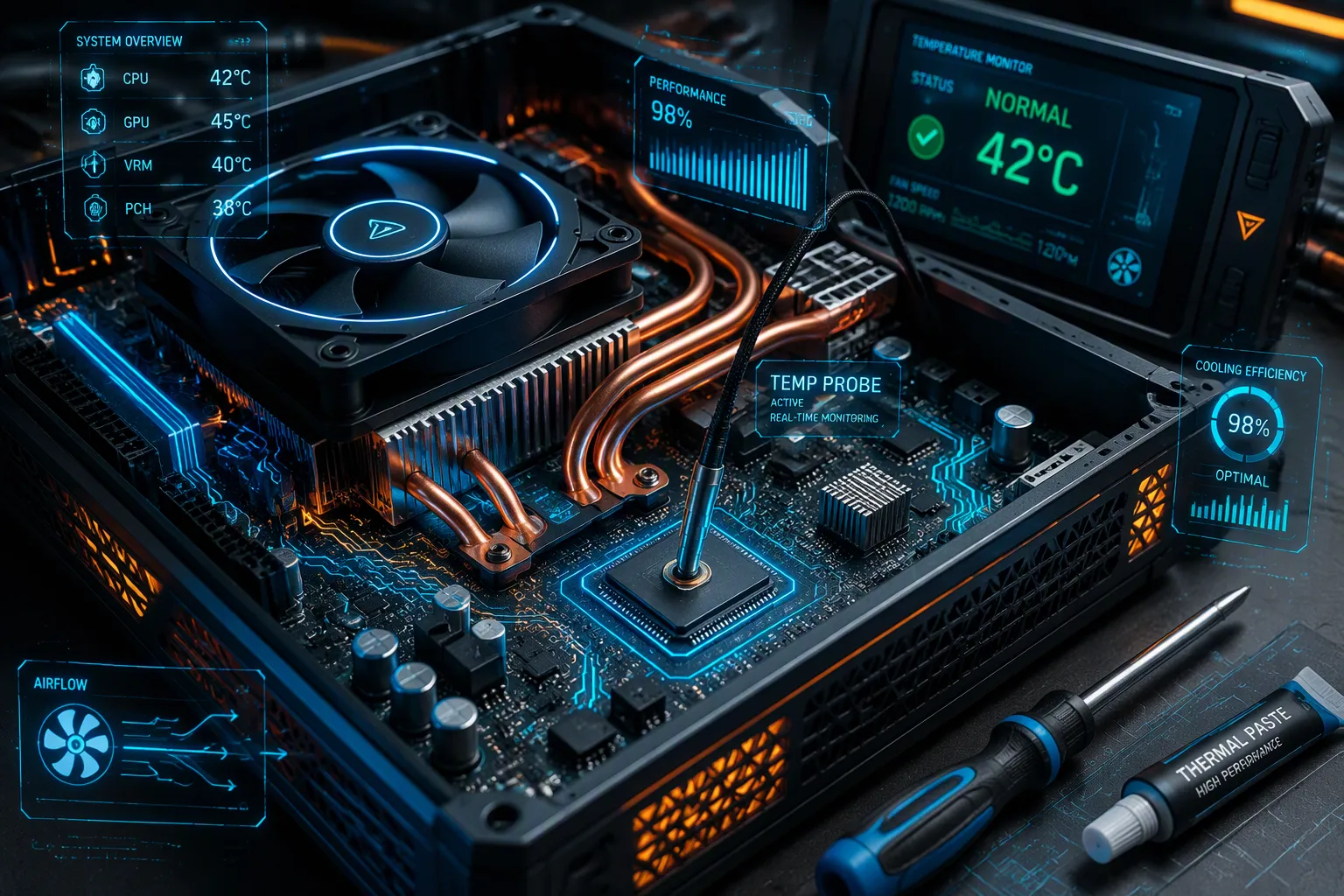
Effective PCB cooling systems boost device longevity by preventing overheating, the leading cause of electronic failure. Proper thermal management can extend device lifespan by up to 83 times. Heat accelerates electromigration, dielectric breakdown, and solder joint fatigue—each a silent killer inside your board.
How do cooling systems extend lifespan, and which design choices matter most? You must understand the heat damage mechanisms first. Then you can select the right PCB cooling method for your power density. Your design features, from thermal vias to component placement, decide the outcome. You protect components from overheating when you match cooling strategy to your operating environment.
Key Takeaways
Effective PCB cooling systems prevent overheating. Proper thermal management extends device lifespan by up to 83 times.
Heat accelerates three failure modes: electromigration, dielectric breakdown, solder joint fatigue. These mechanisms silently destroy electronic components.
Passive cooling serves low-power designs. Active cooling handles high-power applications above 20 watts.
Thermal vias with copper pours create vertical heat paths. These features lower junction temperatures. They reduce hotspot intensity.
Place heat-sensitive components away from hot spots. Maintain airflow clearance around heat sinks for natural convection.
Simulation with accelerated life testing catches thermal problems early. These tools save time. They prevent costly failures.
Match cooling methods to power density. Consider your environment. This choice ensures reliable, long-lived devices.
Avoid undersized vias, degraded thermal interface materials, blocked airflow paths. These mistakes shorten device life.
Why PCB Cooling Determines Device Longevity
Thermal management is not optional. It directly affects performance, safety, and durability. A published reliability review reports that poor thermal management causes more than half of all electronics failures. Temperature alone accounts for more than 55% of field failures, far exceeding vibration at roughly 45%, humidity at 19%, and dust at 8%. These numbers confirm one truth: overheating drives failure risks from overheating more than any other environmental stressor.
How Heat Accelerates Component Failure
Heat does not simply warm a board. It accelerates every chemical and physical process that degrades materials. You must understand three mechanisms to appreciate why effective cooling matters so much.
Arrhenius Equation and Reaction Rates
The Arrhenius model describes how temperature accelerates failure. The failure rate equation is λ = A · e^(Ea / (k·T)), where λ is the failure rate, A is a material constant, Ea is the activation energy, k is the Boltzmann constant, and T is the absolute temperature in Kelvin. The mean time to failure follows MTTF = A × exp(Ea / (k × Tj)), where Tj is the junction temperature in Kelvin and k equals 8.617 × 10^-5 eV/K.
Higher activation energy means greater temperature sensitivity. For GaN HEMTs with Ea around 1.8 eV, every 10°C reduction in junction temperature approximately doubles the MTTF. This relationship explains why effective PCB cooling systems can extend device lifespan by up to 83 times.
Electromigration and Conductor Degradation
Electromigration occurs when electron flow physically displaces metal atoms in conductors. This process forms voids and hillocks that eventually break connections. For aluminum conductors, typical activation energies range from 0.5 to 0.9 eV according to JEP122H. Dielectric breakdown in silicon dioxide shows activation energies between 0.3 and 0.6 eV. Higher temperatures accelerate both mechanisms dramatically.
Solder Joint Fatigue and Thermal Cycling
Solder joints endure mechanical stress each time temperature changes. The board and components expand at different rates. Repeated thermal cycling causes cracks to form and propagate. Eventually, the joint fails completely. Keeping temperatures stable through effective heat dissipation reduces this fatigue and extends component life.
Overheating Risks in Real Devices
Different device categories face distinct consequences when thermal management fails.
Consumer Electronics and Battery Degradation
Smartphones and laptops throttle performance when temperatures rise. Battery chemistry degrades faster at elevated temperatures. You lose capacity and runtime with each thermal event.
Industrial Systems and Downtime
Industrial controllers and motor drives operate continuously. Unexpected shutdowns halt production lines. Repair costs and lost output quickly exceed the price of proper cooling.
Medical Devices and Reliability Standards
Medical devices must meet strict reliability standards. Implantable devices cannot be serviced. Diagnostic equipment must function during critical procedures. Failure is not an option.
Thermal Design Power and Longevity Targets
You must set clear thermal targets during design. These targets determine your cooling strategy.
Maximum Junction Temperature
Every semiconductor has a maximum junction temperature. Exceeding this limit causes immediate damage or accelerated degradation. You must calculate power dissipation and design cooling to keep Tj below this threshold under worst-case conditions.
Derating for Extended Life
Derating means operating components below their maximum ratings. A component rated for 150°C junction temperature might operate at 100°C for extended lifespan. The Arrhenius relationship shows why: lower temperature dramatically reduces failure rate. For GaN HEMTs, the acceleration factor between 150°C and 200°C is approximately 185, meaning MTTF at 150°C is 185 times longer than at 200°C.
Effective cooling directly supports longevity by maintaining lower operating temperatures. Your PCB cooling strategy determines whether your device meets its reliability targets or fails prematurely.
PCB Cooling Systems: Passive and Active Methods
Passive cooling operates without active components like fans, offering a low-maintenance approach to thermal management. You rely on conduction, natural convection, and radiation to move heat away from sensitive components. This simplicity translates directly into reliability. Effective thermal solutions improve reliability, extend product lifespan, and reduce maintenance needs across every device category.
Passive Cooling for Low-Maintenance Longevity
Passive methods suit low-to-moderate power designs. They add no moving parts, no noise, and no power draw.
Thermal Vias and Copper Pouring
Copper conducts heat far better than FR-4 substrate, so the arrangement of copper conductors decides your board's thermal performance. Copper pours flood unused PCB areas with continuous copper connected to a reference plane. This creates a thermal mass that spreads heat and dilutes hotspot intensity. Thicker copper, such as 2–3 oz/ft² versus 1 oz/ft², significantly reduces lateral thermal resistance. Doubling copper thickness effectively halves the spreader's thermal resistance and lowers junction temperature rise.
Thermal vias are copper-plated barrels drilled through the board. They act as vertical thermal columns bridging copper pours across layers. Arrays of 0.3–0.5 mm vias at roughly 1 mm pitch under power pads optimize density without compromising structural integrity. Combining copper pours with thermal via stitching links pours across the stackup and minimizes interlayer thermal resistance.
Q: What role do PCB thermal vias play in temperature control?
A: Thermal vias create vertical heat paths through the board, allowing heat to reach additional copper layers or attached hardware. Arrays of vias under power components significantly lower thermal resistance and help keep junction temperatures within specification.
Heat Sinks and Thermal Pads
Heat sinks increase surface area for natural convection. Thermal pads bridge the gap between component and sink. Both rely on solid thermal contact to work.
Natural Convection and Enclosure Design
Your enclosure shapes airflow. Vents at the bottom and top promote chimney-effect circulation. Sealed enclosures trap heat and demand different strategies.
Active Cooling for High-Power Applications
Active methods move heat with powered components. They handle power densities that passive designs cannot.
Forced Air and Fan Selection
Forced airflow can lower component temperature by 15–25°C compared with natural convection alone. High-reliability fans exceed 70,000 hours MTBF, roughly 8 years of 24/7 operation. A 10-year device lifespan may therefore need at least one fan replacement. Each fan draws 1–10W, adding recurring electricity cost.
Liquid Cooling and Cold Plates
Liquid cooling removes heat through circulating coolant and cold plates. It handles the highest power densities but adds pumps, seals, and fluid maintenance.
Thermoelectric Coolers
Thermoelectric coolers pump heat electronically. They offer precise temperature control at the cost of extra power consumption.
Comparing Cost, Complexity, and Lifespan Impact
Annual cost is not simply a per-part price. Passive cooling tends to have lower upfront and running cost. Active cooling can reduce total 10-year cost if it prevents overheating failures in demanding applications.
Criterion | Passive cooling | Active cooling |
|---|---|---|
Heat dissipation capability | Limited | Significantly higher; forced airflow can lower component temperature by 15–25°C |
Reliability (MTBF) | High | Lower |
Power consumption | None | 1–10W per fan, more for liquid cooling |
Design complexity | Lower | Higher |
Total cost of ownership | Lower | Higher/ongoing costs |
Passive vs. Active Cost-Per-Year Analysis
U.S. Air Force field-repair data shows mechanical parts such as fans cause up to 20–30% of field-replaceable failures in some avionics subsystems. Removing moving parts reduces field failure rate and improves MTBF. Passive cooling therefore carries lower expected failure-related cost over the device lifetime.
Suitability by Power Density and Environment
Passive cooling typically covers thermal design power below 15–20W. Active cooling spans 20W to 200W and beyond. Encapsulated fans rated IP68 reduce dust and moisture failure risk in harsh environments.
Maintenance and Failure Modes
Active cooling adds failure points: fan stoppage, clogged filters, and pump degradation. These may require redundancy or monitoring. Passive cooling has no moving parts and no scheduled service.
Matching your cooling method to power density and environment protects device lifespan. The right choice keeps junction temperatures within specification and avoids unnecessary complexity.
The PCB's Role in Temperature Regulation
Your PCB does more than hold components. It acts as a thermal highway that moves heat away from sensitive junctions. As power densities climb, board-level thermal management directly affects device reliability, electrical performance, and operational lifespan. You must design the board itself as part of your cooling strategy.
Design Features That Dissipate Heat
Copper planes and thermal vias and heat sinks form the backbone of board-level heat dissipation. Each feature plays a distinct role in moving heat transfer away from hot spots.
Thermal Relief Patterns and Plane Layers
Copper planes spread heat laterally across the board. A 2 oz copper plane is itself a negligible thermal resistor. The dominant vertical resistance is the FR-4 dielectric between the heat source and the copper plane. Interrupted copper from plane splits or narrow necks can still act as a thermal bottleneck.
Heavy Copper and Metal Core PCBs
Thicker copper lowers resistance and spreads heat more effectively. Heavy copper multilayers with up to 6 oz outer layers suit power levels above 100 W. Metal core PCBs move heat quickly from components to heat sinks or enclosures. Aluminum PCBs transfer heat 8–9 times faster than standard FR-4.
Embedded Thermal Sensors and Feedback
You can embed sensors to monitor board temperatures in real time. This feedback lets your system adjust power or fan speed before damage occurs. IR cameras or thermocouples can pinpoint temperature issues during validation.
How Stackup Affects Thermal Performance
Your stackup choices determine how efficiently heat moves through the board.
Layer Count and Copper Weight
Multiple copper planes increase the in-plane area available to spread heat. Thicker copper reduces lateral resistance along a trace or plane. Adding heavy copper to a remote layer does not remove a vertical bottleneck under a component.
Dielectric Materials and Thermal Conductivity
Standard FR-4 exhibits thermal conductivity around 0.3 W/m·K. High-Tg FR-4 offers better thermal stability under elevated temperature and thermal cycling. Metal core PCBs using aluminum or copper substrates offer thermal conductivity of 1–7 W/mK. Copper core PCBs reach up to 400 W/mK.
Via Placement and Thermal Path Design
Thermal vias beneath hot chips transfer heat from the top layer to bottom copper or internal planes. A via diameter around 0.3 mm and pitch of 1 mm balances thermal conductance with fabrication yield. Thermal vias only reduce thermal resistance when they connect to a substantial copper area.
Integrating PCB Cooling with System-Level Management
Your board-level design must coordinate with the larger thermal system.
Interface Materials and Gap Fillers
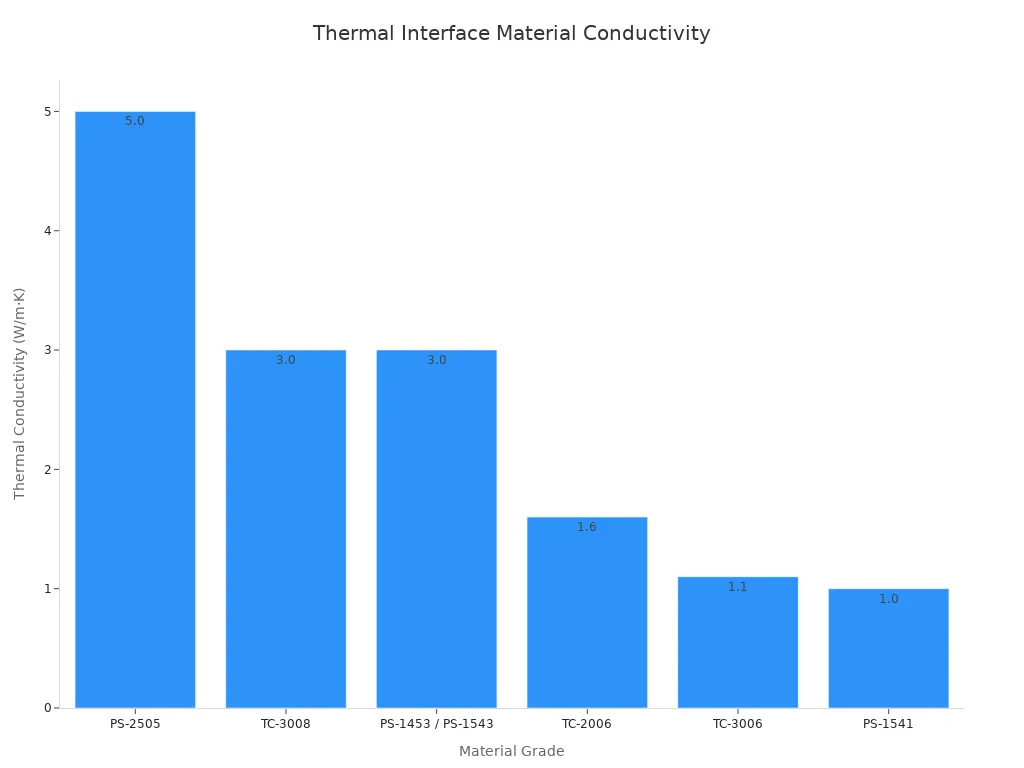
Thermal interface materials reduce contact resistance between the PCB and heat sink. General TIM thermal conductivity ranges from 1.0–5.0 W/m·K depending on filler system. Compressed thickness determines actual heat transfer performance.
Airflow Path Coordination
Hotspots near power devices often stem from airflow blockage. You must align board layout with enclosure vents and fan placement.
Thermal Simulation Across Boundaries
CFD and FEA modeling across board and enclosure boundaries prevents costly overheating failures. Simulate via field density to optimize thermal performance without over-perforating the board.
Design Strategies for Longevity Through Cooling
Strategic design techniques for enhanced PCB durability include thermal vias and heat sinks, careful component placement, and effective cooling methods. These choices determine whether your device survives years of operation or fails early from overheating.
Component Placement for Heat Dissipation
You must position heat-generating components near board edges. This placement maximizes exposure to ambient airflow and simplifies heat sink attachment. Spread multiple power regulators across the board instead of clustering them together. Clustering creates thermal bottlenecks that impede natural airflow patterns.
Keeping Heat-Sensitive Parts Away from Hotspots
Electrolytic capacitors rated for 85°C to 105°C and precision resistors belong in cooler board zones. Place them away from power ICs and other major heat sources. Sensors and temperature-sensitive components need separation from converters and power amplifiers to protect calibration accuracy.
Spacing and Orientation for Airflow
Maintain at least 10–15 mm of clearance around heat sinks for free air circulation. Orient heat sink fins with your enclosure's airflow direction. Poor fin orientation can reduce cooling efficiency by up to 30%. Vertical board orientation leverages natural convection, where heated air rises and draws cooler air upward.
Thermal Coupling and Isolation
Group power devices near copper-heavy areas or airflow paths for predictable heat distribution. Thermal vias under hot chips channel heat to internal planes. Arrays of 0.3 mm vias spaced 1 mm apart lower PCB thermal resistance through parallel conduction paths.
Material Selection for Thermal Reliability
Your substrate choice shapes heat transfer away from hot spots. Standard FR-4 conducts heat poorly compared with metal-backed alternatives.
High-Tg FR-4 and Advanced Substrates
High-Tg FR-4 offers better thermal stability under elevated temperatures and thermal cycling. This material resists degradation during repeated heating and cooling cycles.
Metal-Backed and Ceramic Substrates
Aluminum PCBs transfer heat 8–9 times faster than standard FR-4. Copper core PCBs reach thermal conductivity up to 400 W/mK. These substrates suit high-power applications where FR-4 cannot manage thermal loads.
Thermal Interface Materials
Thermal interface materials reduce contact resistance between the PCB and heat sink. General TIM thermal conductivity ranges from 1.0–5.0 W/m·K depending on filler system. Compressed thickness determines actual heat transfer performance.
Simulation and Testing for Lifespan Prediction
Early simulation prevents costly overheating failures later. Virtual testing reduces the need for expensive prototype iterations.
CFD and FEA Thermal Modeling
Abaqus/CAE provides specialized low-cycle fatigue capability for solder joint life simulation under cyclic thermal shock loading. This nonlinear FEA software enables virtual testing across industries. Thermal cycling from -40°C to 125°C produces peak stress around 50 MPa at BGA corners with predicted lifespan near 2,500 cycles.
Accelerated Life Testing and Thermal Cycling
IPC-9701A addresses thermal cycling endurance for array-type surface mount attachments. JEDEC JESD22-A104 subjects solder joints to repeated thermal excursions from -40°C to +125°C. These tests reduce qualification time from months to weeks.
Infrared Thermography and Validation
IR cameras pinpoint temperature issues during validation. This feedback lets your system adjust power or fan speed before damage occurs. Early thermal analysis reduces rework and enhances device lifespan.
Choosing the Right PCB Cooling Solution
Effective PCB cooling helps ensure temperatures stay within safe limits, allowing proper operation without heat-related failure. You must match your cooling method to your application's power density, environment, and reliability requirements. The right choice reduces maintenance needs and extends product lifespan.
Matching Cooling Method to Application
Your application dictates which cooling approach works best. Consumer devices prioritize size and cost. Industrial systems demand durability. Automotive electronics face extreme temperatures and vibration.
Consumer, Industrial, and Automotive Differences
Consumer electronics typically operate in moderate conditions with short duty cycles. Industrial controllers run continuously in fixed installations. Automotive modules must survive temperature swings from -40°C to 125°C. Each category requires different thermal strategies.
Sealed vs. Ventilated Enclosures
Sealed enclosures trap heat and demand conduction-based cooling paths. Ventilated enclosures allow natural or forced convection. Your enclosure design determines whether passive cooling can succeed or active cooling becomes mandatory.
Noise, Size, and Weight Constraints
Fans generate audible noise and add weight. Liquid cooling systems require pumps and plumbing. You must balance thermal performance against these physical constraints for your specific product.
Balancing Cost, Reliability, and Longevity Goals
You must weigh upfront costs against warranty exposure and failure consequences. A cheaper cooling solution may cost far more over the product lifetime.
Upfront Cost vs. Warranty and Failure Cost
Fans add $2–5 per unit. Liquid cooling costs 5–10× air cooling. These upfront expenses must be compared against warranty claims and field failure costs. Poor thermal management drives failures that damage your brand reputation.
Mean Time Between Failures Calculations
Calculate MTBF for your cooling components. Fans have finite lifespans measured in hours. Passive cooling eliminates moving parts and their associated failure modes. This calculation guides your redundancy and monitoring decisions.
When Passive Cooling Is Enough
Passive cooling suits moderate heat generation, typically under 50 W. You can use thicker copper layers and ventilated enclosures. Active cooling becomes necessary when worst-case 85°C ambient pushes components toward their 125°C limit.
Common Mistakes That Shorten Device Life
Inadequate PCB cooling creates failure points that emerge months or years after deployment. Avoid these errors during design.
Undersizing Thermal Vias
Thermal vias conduct heat between PCB layers. Undersized or too few vias create thermal bottlenecks. Use via arrays under high-heat components connected to ground planes or heat sinks.
Ignoring Interface Material Degradation
Thermal interface materials degrade over time. Their thermal conductivity drops as they dry out or pump out. You must select materials rated for your operating temperature and expected service life.
Poor Airflow Path Design
Blocked airflow paths create hotspots. Components near power devices often suffer from inadequate ventilation. You must coordinate board layout with enclosure vents and fan placement.
Effective cooling solutions optimize performance under demanding conditions. Thermal vias and heat sinks work together with proper component placement to ensure long-term reliable device operation.
How Cooling Extends Longevity Across Device Categories
Effective heat dissipation assures reliability and lifespan of electronic equipment across every category. Cooling needs and longevity outcomes differ by application. As power densities increase, PCB thermal management becomes even more critical for durability.
Consumer Electronics and Wearables
Compact devices trap heat in tight spaces. You must design cooling paths that fit within slim form factors.
Smartphones and Thermal Throttling
Smartphones throttle CPU speeds when junction temperatures climb. Android devices reduce clock speeds and brightness before reaching critical limits. CPU junction throttling typically engages at 95–105°C, though manufacturers may throttle earlier to keep surfaces below 45°C. Sustained temperatures above 40°C accelerate battery degradation. Constant heat stresses lithium-ion cells and reduces capacity over time. Prolonged overheating can warp circuits and loosen solder points. These effects shorten device lifespan significantly.
Laptops and Sustained Performance
Laptops face similar thermal constraints. Fans and heat pipes manage heat during heavy workloads. Poor cooling forces the processor to throttle, reducing performance. You lose productivity when thermal limits cap processing power.
Industrial and Automotive Electronics
Industrial and automotive systems operate in harsh conditions. Temperature extremes and vibration demand robust thermal solutions.
Motor Controllers and Power Inverters
Motor controllers and inverters generate substantial heat during operation. These systems require active cooling or heavy copper planes. Automotive electronics must survive temperature swings from -40°C to 125°C. AEC-Q100 Grade 0 devices handle -40°C to +150°C for under-hood stability. Reliability targets often exceed 15 years of operation.
Under-Hood and High-Vibration Environments
Under-hood temperatures exceed 150°C in some locations. Vibration adds mechanical stress to solder joints. You must combine thermal vias and heat sinks with vibration-resistant mounting. Thermal interface materials must resist degradation under constant thermal cycling.
Medical and Aerospace Devices
Medical and aerospace applications demand the highest reliability. Failure is not an option in these critical systems.
Implantable and Diagnostic Equipment
Implantable devices must operate reliably for years without maintenance. They require ultra-compact thermal solutions and biocompatible materials. Medical applications often need temperature control within ±1°C tolerance. Fail-safe operation must continue even during power failures.
Avionics and Satellite Systems
Avionics systems must withstand launch vibration and extreme temperature cycles. Spacecraft electronics face temperature ranges from -40°C to 80°C as they move between sunlight and shadow. Materials must meet strict outgassing requirements per NASA specifications. Minimizing mass reduces launch costs. These constraints demand careful thermal design for long-term reliable operation.
Effective cooling enables long-lasting electronic devices across all categories. Thermal vias and heat sinks work together with proper component placement. As power densities rise, PCB cooling becomes central to achieving your longevity goals.
Effective PCB cooling systems slow Arrhenius-driven degradation, reduce thermal cycling fatigue, and hold junction temperatures within safe limits. These three effects explain why device longevity improves so dramatically when you manage heat well.
Passive methods suit low-power designs. Active methods become necessary at high power density. Your stackup, material choice, and component placement matter as much as any external hardware.
Simulation and testing early in design prevent costly overheating failures later. Thermal vias, careful layout, and validated heat dissipation paths catch problems before production.
As devices shrink and power rises, PCB cooling will sit at the center of longevity engineering. Treat lifespan as a thermal design outcome, not an afterthought.
FAQ
How much can effective PCB cooling extend device lifespan?
Proper thermal management can extend device lifespan by up to 83 times. The Arrhenius relationship explains this gain. Lower junction temperatures slow electromigration, dielectric breakdown, and solder joint fatigue. You achieve these results when you keep operating temperatures within safe limits throughout the product's service life.
What percentage of electronics failures come from overheating?
Temperature accounts for more than 55% of field failures. That figure far exceeds vibration at roughly 45%, humidity at 19%, and dust at 8%. These numbers confirm that overheating drives failure risks more than any other environmental stressor. You must treat thermal management as a primary design requirement.
When does passive cooling suffice for a PCB design?
Passive cooling typically covers thermal design power below 15–20W. You can push it to about 50W with thicker copper layers and ventilated enclosures. Active cooling becomes necessary when worst-case 85°C ambient pushes components toward their 125°C limit. Match your method to your actual power density and environment.
How do thermal vias lower junction temperature?
Thermal vias are copper-plated barrels that create vertical heat paths through the board. Arrays of 0.3–0.5 mm vias at roughly 1 mm pitch under power pads optimize density. They only reduce thermal resistance when they connect to a substantial copper area on another layer.
What is the Arrhenius equation's role in lifespan prediction?
The Arrhenius model describes how temperature accelerates failure. The mean time to failure follows MTTF = A × exp(Ea / (k × Tj)), where Tj is junction temperature in Kelvin and k equals 8.617 × 10^-5 eV/K. For GaN HEMTs with Ea around 1.8 eV, every 10°C reduction in junction temperature approximately doubles the MTTF.
How does forced airflow compare to natural convection?
Forced airflow can lower component temperature by 15–25°C compared with natural convection alone. High-reliability fans exceed 70,000 hours MTBF, roughly 8 years of 24/7 operation. A 10-year device lifespan may therefore need at least one fan replacement. Each fan draws 1–10W, adding recurring electricity cost.
Which PCB substrate materials handle high power best?
Standard FR-4 exhibits thermal conductivity around 0.3 W/m·K. Metal core PCBs using aluminum or copper substrates offer thermal conductivity of 1–7 W/mK. Copper core PCBs reach up to 400 W/mK. Aluminum PCBs transfer heat 8–9 times faster than standard FR-4, making them suitable for high-power applications.
What common design mistakes shorten device life?
Undersized thermal vias create thermal bottlenecks. Ignoring interface material degradation leads to dried-out or pumped-out TIM with dropping thermal conductivity. Poor airflow path design creates hotspots near power devices. You must coordinate board layout with enclosure vents and fan placement to avoid these errors.
