High-Voltage PCB Design Basic Safety Rules
You need to follow strict rules when you work with high-voltage PCB design. Here are some important safety rules:
Follow UL60950-1 safety standards.
Follow CSA 22.3 safety standards.
Keep minimum clearances and extra clearance as needed.
Make sure the surface is smooth to lower the chance of electrical arcing.
Try to remove burrs on the board edges after cutting.
Do not use sharp corners in the layout of traces and pads.
If you do not follow these rules, insulation can fail and arcing can happen. These rules help keep your project and you safe. Engineers, technicians, and students should learn these safety basics.
Key Takeaways
Always follow safety rules like UL 60950-1 and IPC 2221A. These rules help make sure your high-voltage PCB design is safe.
Leave enough space between conductors for clearance and creepage. This helps stop arcing and electrical breakdown.
Use strong insulation materials that can handle high voltages. This protects your PCB from getting damaged.
Check and update your knowledge of safety standards often. This helps keep your designs safe and following the rules.
Use good design steps, like not using sharp corners. Also, use protective enclosures to make things safer.
Essential Safety Rules for High-Voltage PCB Design
Key Safety Guidelines
You have to follow strict safety rules when working with high-voltage pcb design. These rules stop pcb arcing and keep your project safe. International safety standards like IPC 2221A and UL 60950-1 tell you how much space to leave and what materials to use.
Tip: Always check the newest standards before starting your pcb layout. Standards can change, so new rules might be needed.
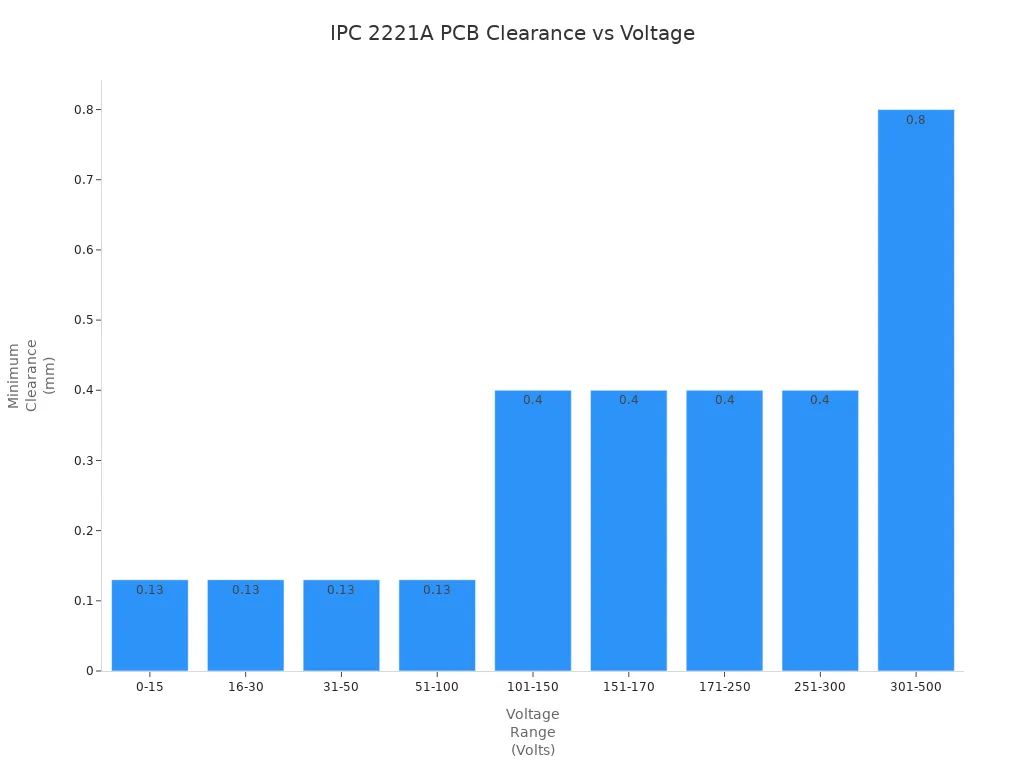
You must leave enough space between high voltage traces. IPC 2221A gives you exact numbers for the smallest clearance. For example, if you use 500 volts, you need at least 6.4 mm between conductors on a clean, uncoated board. If you use 1000 volts in a pollution degree 2 place and use a material in Group II, you need about 10 mm creepage and 8 mm clearance.
Here is a table that shows the smallest clearance for finished boards:
Voltage between conductors (Volts) | Minimum clearance for assembled board (mm) |
|---|---|
0-15 | 0.13 |
16-30 | 0.13 |
31-50 | 0.13 |
51-100 | 0.13 |
101-150 | 0.4 |
151-170 | 0.4 |
171-250 | 0.4 |
251-300 | 0.4 |
301-500 | 0.8 |
Greater than 500 | 0.00305 mm/volt |
You also need to pick the right insulation materials. UL 60950-1 says you must use reinforced insulation between primary and secondary circuits. The board material should handle high voltages and overvoltage. Always use materials made for high-voltage pcb design.
Use reinforced insulation in high-voltage spots.
Pick board materials that can handle high voltage and overvoltage.
Learn about insulation types: functional, basic, supplementary, double, and reinforced.
You must protect your pcb from ESD and surges. MIL-STD-883 and IEC 61000-4-2 help you stop ESD events. IEC 61000-4-5 covers lightning surges. Always keep enough clearance and creepage to stop tracking and arcing.
Immediate Actions for Designers
You need to act right away when you design a high-voltage pcb. These steps help you avoid mistakes and keep your pcb safe.
Make spacing bigger than the smallest amount. Extra space lowers the chance of arcing.
Use slots or barriers. Barriers or slots make creepage distance longer and stop tracking.
Make trace routing better. Do not use sharp corners in high voltage traces. Sharp corners can focus electric fields and cause trouble.
Control the environment. Make enclosures to keep your pcb safe from humidity and dust. These things can lower dielectric strength and cause problems.
Use design software with rule checking. PCB design tools help you follow clearance and creepage rules.
Test in real-world conditions. Hi-pot testing checks insulation strength during normal use.
Think about where you put parts. Keep high-voltage parts away from low-voltage areas to stop interference.
Write down and check your work. Write your design choices and check them with others. Peer reviews can find mistakes you miss.
Note: You must always follow safety standards and write down your work. This keeps your pcb safe and working well.
You should remember that high-voltage pcb design needs careful planning. You must follow all safety rules and standards. This keeps you, your project, and users safe.
Why Safety and Reliability Matter in High Voltage PCB Design
Risks of Non-Compliance
It is important to know the dangers of not following safety rules in high-voltage pcb design. If you ignore these rules, big problems can happen. High-voltage arcing can break parts or even burn up a pcb. This damage can hurt you, your tools, and your work area. Arcing might also start fires or give people electric shocks.
If you skip steps like hi-pot testing, you may not find weak insulation. Weak insulation can break down. When this happens, high-voltage can jump over small spaces and cause arcing. Overvoltage or voltage spikes make things worse. You could lose control of your design, and this can be very dangerous.
Not keeping enough clearance and creepage makes electrical breakdown more likely. Safety and reliability keep you and your project safe.
Impact on Reliability
You want your high-voltage projects to last and work well. Following safety and reliability rules helps you do this. Good spacing and insulation lower the chance of failure. You should follow IPC-2221 rules to stop arcing and breakdown. The environment matters too, because dust and moisture can cause trouble.
Pick the right dielectric materials for your pcb.
Make sure insulation is thick enough to stop breakdown.
Use careful steps when making your pcb to keep it safe and reliable.
When you follow these rules, your high-voltage circuits last longer. You save money on repairs and keep people safe. Good safety and reliability make your design strong, even with overvoltage or voltage spikes.
Key Terms in High-Voltage PCB Design
Clearance and Creepage
You need to know about clearance and creepage in high-voltage pcb design. These words help you stop electrical breakdown and keep your pcb safe. If you do not follow the rules for these spaces, you can have problems with compliance.
Clearance is the shortest way through air between two conductive parts. You measure this distance in a straight line.
Creepage is the shortest way along the surface of an insulating material between two conductive parts. This path can go around corners or edges.
Industry standards like IPC 2221A give rules for these distances. You must check the minimum creepage distance for your voltage and environment. The minimum creepage distance helps stop tracking and conductive anodic filamentation. You should always follow the rules for both clearance and creepage. If you do not, you can have compliance problems and your pcb might fail.
Tip: Always look at the newest standards for minimum creepage distance. This keeps your design safe and helps you avoid compliance problems.
Insulation Types
You must pick the right insulation for your pcb. The kind of insulation changes how much voltage your board can handle. If you choose the wrong material, you can have compliance problems and risk electrical breakdown.
Here is a table that shows common insulation types, their breakdown voltages, and their properties:
Insulation Type | Breakdown Voltage | Properties and Limitations |
|---|---|---|
FR-4 | High | Porous, can get dirty, weak edges, no recovery from carbonization |
BT Epoxy | Medium | Strong sides, better for flat coils, good electrical properties |
High V Laminates | Very High | Non-conductive base, puts out arcs, made for tough environments |
You must check the minimum creepage distance for each insulation type. This helps you meet the rules and avoid compliance problems. Always use materials that fit your voltage needs and follow all the rules.
Clearance and Creepage Requirements
Minimum Distances
You need to leave enough space between high-voltage spots on your pcb. This space is called clearance. If you do not leave enough clearance, arcing and damage can happen. The minimum space depends on the voltage you use. For example, with 250 volts, you need at least 0.4 mm between conductors. Higher voltages need more space. Always check the newest safety standards before you start your design.
Creepage is the shortest path along the board’s surface between two points. Make this path long enough to stop tracking and surface breakdown. If you do not, dirt or water can make current flow where it should not. Always follow the rules for clearance and creepage to keep your board safe.
Tip: Use a ruler or your design software’s measuring tool to check all spaces before you finish your layout.
Influencing Factors
Many things can change how much clearance and creepage you need. The environment is very important. Humidity and pollution can make insulation weaker. If you work in a dusty or wet place, you must use bigger spaces to stay safe. Pollution degree tells you how much dirt and moisture are in the air. A higher pollution degree means you need more space.
Here is a table that shows important factors:
Factor | Description |
|---|---|
Pollution Degree | This is based on how much dry pollution and condensation are in the environment. It affects the space you need. Rated from 1 (least) to 4 (most). |
Operating Voltage | Higher voltages need bigger clearance and creepage distances for safety. |
Safety Standards | Standards like UL and IEC tell you what spaces to use based on the environment. They help keep people safe. |
You also need to think about the insulation you use. Some materials work better in tough places. Always match your material to your voltage and pollution level. This helps you avoid problems and keeps your high-voltage pcb safe.
Factors Affecting High-Voltage PCB Safety
Voltage Levels and Thresholds
You need to know what high-voltage means in PCB work. Most experts say 100V or more is high-voltage. If you use these voltages, you must follow strict safety rules. Higher voltage needs more space between conductors. This space stops arcing and keeps your board safe.
Voltage Range (V) | Minimum Clearance (mm) for External Conductors | Minimum Clearance (mm) for Internal Conductors |
|---|---|---|
101 - 150 | 0.6 | N/A |
301 - 500 | 1.5 | 0.8 |
Above 500 | 2.5 or more | N/A |
Always check the voltage in your project. Use the right clearance for each voltage range. This protects your board and makes it work better.
Pollution Degree and Environment
The place around your PCB affects safety. Pollution degree shows how much dust or moisture is there. Clean rooms need less creepage distance. Dirty or wet places need more creepage.
Pollution Degree | Description | Creepage Distance Requirement |
|---|---|---|
Degree 1 | Clean, sealed equipment | Minimal creepage needed |
Degree 2 | Office or lab, some dust or condensation | Moderate creepage required |
Degree 3 | Industrial, lots of dust or moisture | Larger creepage distances needed |
Degree 4 | Outdoor, harsh, always dirty or wet | Maximum creepage distances needed |
Higher pollution degrees need bigger creepage distances.
Pollution degree helps you choose the right safety steps.
Tough environments need stricter safety rules.
Material and Insulation Choices
You must pick good materials for insulation. Good materials stop breakdown and arcing. Some materials work better in tough places or at high heat.
Material | Characteristics | Applications |
|---|---|---|
Polyimide | Handles heat, stops breakdown | Flexible boards, tough jobs |
Ceramics | Very strong, good for heat | Power, medical, aerospace |
PTFE | Strong, resists heat, low losses | RF and microwave boards |
HVPF (High Voltage Teflon) | Great insulation, resists arcing | Power and RF circuits |
BT Epoxy | Strong, cost-efficient, good for heat and voltage | Multilayer high-voltage boards |
Phenolic-cured Laminates | Cheap, resists heat and stress | Medium to low high-voltage boards |
Isola Laminate | Strong, stable with heat | Tough high-voltage jobs |
Pick the best material for your voltage and environment. This helps your design last longer and stay safe.
Altitude Effects
Altitude changes how air insulates your board. Higher places have thinner air. Thin air cannot stop arcing as well as thick air. You must make clearance and creepage bigger at high places.
Higher altitude means weaker air insulation.
At 5,000 meters, spacing needs to be almost 50% bigger than at 2,000 meters.
Always change your layout if your board will work at high altitudes.
Tip: Always check the altitude for your project. Make changes to your design to keep it safe anywhere.
Compliance with High-Voltage PCB Standards
IPC 2221A Guidelines
You need to know about IPC 2221A when you design high-voltage boards. This guideline tells you how much space to leave between conductors. It gives you numbers for both clearance and creepage. You can find tables in IPC 2221A that show the minimum distances for different voltages. These rules help you stop arcing and keep your board safe. You should always check the latest version before you start your layout. IPC 2221A also explains how to pick materials that work well with high voltage. You can use this guideline to make sure your design meets safety needs.
Tip: Use your design software to set up clearance rules based on IPC 2221A. This helps you catch mistakes early.
UL 60950-1 and Other Standards
You must follow UL 60950-1 if you want your product to be safe for users. This standard tells you how to test insulation and what materials to use. It also explains how to protect people from electric shock. UL 60950-1 is common for many electronic products. Other international standards also help you design safe boards. For example, IEC 60950-1 gives clear rules for insulation and testing. IEC 62368-1 uses a hazard-based approach. It looks at all possible dangers, not just voltage.
Here is a table that shows how some standards handle high-voltage safety:
Standard | Approach to High-Voltage PCB Safety |
|---|---|
IEC 60950-1 | Emphasizes prescriptive requirements for insulation and testing. |
IEC 62368-1 | Adopts a Hazard Based Safety Engineering (HBSE) approach, focusing on safety safeguards. |
You should always check which standards apply to your project. Following these rules keeps your pcb safe and helps you pass inspections.
Practical High-Voltage PCB Design Tips
Spacing and Trace Routing
When you design a high-voltage pcb, you must use good layout habits. Good spacing and careful trace routing help stop electrical problems. They also help you avoid mistakes when making the board. The table below gives you some easy rules to follow:
Best Practice | Description |
|---|---|
Minimum Spacing | Leave enough room between traces. For 50V, use at least 12 mils. For 500V, use over 100 mils. |
Trace Length Optimization | Make important signal traces as short as you can. This stops delays and keeps signals strong. |
Avoid Sharp Corners | Use 45-degree angles or smooth curves. Sharp corners can cause signal trouble. |
Thermal Management | Make wide traces or use copper pours for high current. This helps control heat. |
Design for Manufacturability | Match your trace layout to what the factory can make. Follow the smallest width and spacing rules. |
If you follow these tips, your high-voltage pcb will be safer and work better. You will also meet the rules for creepage distance.
Using Protective Enclosures
You can keep your pcb safe by putting it in a strong box. High-voltage boards need extra safety steps. Here are some ways to protect your pcb:
Over-current and over-voltage protection: Use circuit breakers, varistors, and TVS diodes to stop voltage spikes.
Environmental sealing: Use gaskets, O-rings, or waterproof boxes to keep out water, dust, and dirt.
These steps help your pcb last longer and work well in hard places.
Color Coding High-Voltage Nets
You can make your pcb safer by using color codes for high-voltage nets. Pick bright colors like red or orange for high-voltage traces. This makes it easy for people to see dangerous spots. It helps stop mistakes when building or fixing the board.
Tip: Always mark high-voltage spots clearly. This keeps everyone safe and helps stop accidents.
Applying Conformal Coatings
You can protect your pcb even more by using conformal coatings. These coatings keep out water, dust, and chemicals. In high-voltage boards, coatings help keep creepage distance and stop tracking. Pick a coating that fits your voltage and where your pcb will be used.
Note: Use conformal coatings in places with lots of moisture or dirt. This makes your pcb safer and helps it last longer.
Common High-Voltage PCB Design Mistakes
Underestimating Distances
You might think small spaces are okay, but high-voltage designs need bigger gaps. Many designers forget to leave enough space between traces. This mistake can cause electrical shorts or signal problems. If you do not follow the right clearance rules, arcing can happen. Arcing can damage your pcb and make it stop working. You may have to redesign your board, which takes time and money.
Designers sometimes do not leave enough space in high-voltage PCB layouts. This can cause electrical shorts and signal problems.
Not enough trace clearance can lead to arcing, especially in high-voltage boards. This puts the PCB at risk.
These mistakes can make you redo your design and slow down production. That is why you must follow clearance standards.
Here is a table that shows spacing needs for 80V designs:
Aspect | Requirement |
|---|---|
Internal layer spacing | 0.1mm |
External layer spacing | 0.6mm |
Coated external layer spacing | 0.13mm |
Creepage strategies | Use vertical barriers or slots |
Material properties | Consider CTI ratings |
Tip: Always check your layout for enough space. Small gaps can cause big trouble.
Ignoring Environmental Factors
You need to think about where your board will be used. Pollution degree tells you how dirty or wet the place is. More pollution means you need bigger creepage distances. Material properties are important too. The CTI value shows how well a material stops tracking. If you use materials with high CTI values, you can use shorter creepage distances safely. Altitude changes air pressure and insulation. Boards used above 2000 meters need more space to stay safe.
Pollution Degree: Places are put into four pollution degrees. Higher degrees need bigger creepage distances to stop surface problems.
Material Properties (CTI Value): CTI value shows how well a material stops tracking. Materials with higher CTI values can use shorter creepage distances. This is important for safety in high-voltage boards.
Altitude: Higher places have lower air pressure and weaker insulation. This changes creepage needs, especially above 2000 meters.
Note: Always match your design to the place it will be used. If you ignore these things, your pcb might not be safe.
Overlooking Standard Updates
You must keep up with the newest safety standards. Standards change when technology gets better. If you use old rules, your board might not pass checks. New standards give new spacing and insulation rules. Always check IPC 2221A and UL 60950-1 before you start your design. You keep your project and users safe by following the latest rules.
Alert: Standards change a lot. Check them before every new design.
You must follow high-voltage PCB safety rules to keep your designs safe and reliable. Always use the right materials and check your work. To help you stay compliant and avoid mistakes, remember these steps:
Test your boards for strength, insulation, and heat.
Follow standards like IPC-2221 and UL 61010.
Choose strong insulation materials.
Keep enough space between conductors.
Use isolation parts, such as optocouplers.
Add good grounding and shielding.
Keep learning and stay alert. Your careful work protects everyone.
FAQ
What is the safest way to measure clearance and creepage on a PCB?
You can use a ruler or a digital caliper to check the space. Design software can also help you measure these spots. Always look at your numbers and compare them to the newest safety rules.
How do you choose the right insulation material for high-voltage PCBs?
You should think about the voltage and where the board will be used. Materials like FR-4, polyimide, or ceramics are good choices. Check the CTI value and make sure the material follows safety rules.
Why do you need to avoid sharp corners in high-voltage PCB layouts?
Sharp corners make electric fields stronger in one spot. This can cause arcing or breakdown. Use smooth curves or 45-degree angles to keep your board safe.
What happens if you ignore creepage and clearance rules?
You could get electrical shorts, arcing, or even fires. Your PCB might stop working or hurt someone. Always follow the rules to keep your project and people safe.
Can you use conformal coatings for extra protection?
Yes! Conformal coatings help keep out water and dust. They protect creepage distance and make your board last longer. Pick a coating that works for your voltage and where you use the board.
See Also
Important Considerations When Designing PCB Circuit Boards
Key Guidelines for Creating Heavy Copper PCBs for High Current
Seven Vital Quality Control Steps for Heavy Copper PCB Assembly
